Differentiation with Technology
Technology can be used to differentiate instruction for diverse learners by creating environments that appeal to student interest. Based on the Developing Remedial Instruction unit plan in Topic 4, Pastor Clark and I met to look at the curriculum and worked to plan with colleagues to incorporate technology into the lesson plans in a way that facilitated differentiation. We developed a plan based on the previous lesson and integrated technology into the unit that would allow them to work in pairs and small group settings. Technology integration in the 21st century classroom is critical for lesson plans and differentiation.
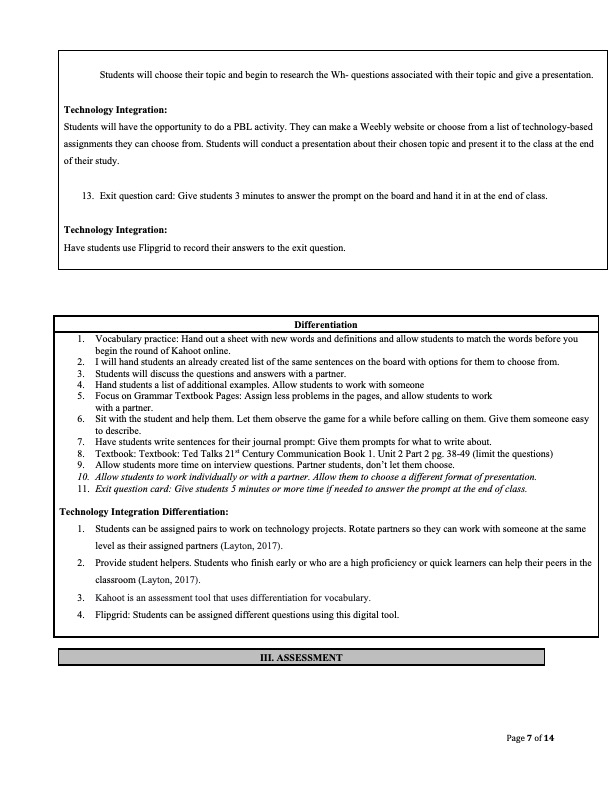
Teachers can differentiate instruction based on the needs of the class. “Advances in differentiated instruction technology tools can help teachers meet the challenges of this worthwhile approach to instruction, automating some of the most time-consuming and cumbersome parts so they can focus on what matters most: the students in front of them” (Richards, 2019). It is important to know the students and the individual needs of the students in your class. This means you need to know their abilities and learning styles. Technology enables students to engage and master the content in the unit. Pastor Clark and I developed a lesson that facilitated technology differentiation in the classroom setting. One way to differentiate instruction was to allow for pairs and group work. “Pairing students up can be a good idea, but it can be tricky. One of the advantages of digital curriculum is that it automatically provides differentiated instruction. The digital lessons progress at the rate of the learner, so students should be paired with someone who has the same content-proficiency as them” (Layton, 2017).
The following digital technology sources were incorporated within the lesson plan. Those technology sources were as follows:
- Google Classroom
- Kahoot
- Interactive whiteboard
- Literably https://literably.com/
- EdPuzzle https://edpuzzle.com/
- Mentimeter: https://www.mentimeter.com/
- TedTalks
- Google Suite
- Flipgrid.
- Floop
- Project Based Learning
- Storybird https://storybird.com/
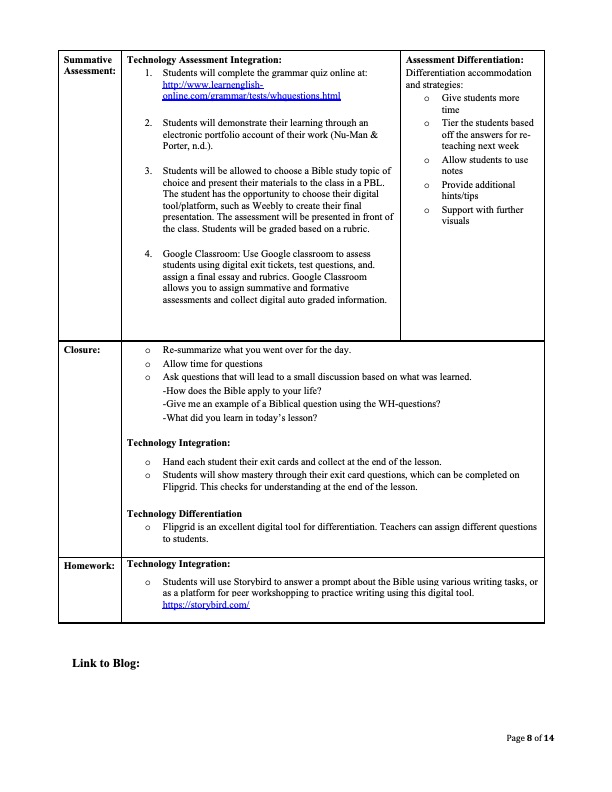
Technology was used to asses’ students in a pre-assessment using Google Classroom. This pre-assessment was 10 questions and based on prior knowledge. Google Classroom and Google Suite are easy technology tools that allows for students to post responses, take quizzes, turn in assignments, view slides, and upcoming work. The assessment quiz is graded immediately and feedback is instant. Based on the data, I can assess the student’s specific needs. Google Classroom will also be used in journal entries and prompts. Students will answer textbook questions using Google dogs. Students will work with a partner in Google Docs to answer the questions and share the document with the teacher.
Google classroom is an excellent tool to assess students using digital exit tickets, test questions, and. assign a final essay and rubrics. Google Classroom allows you to assign summative and formative assessments and collect digital auto graded information. This allows for pre-assessment questions.
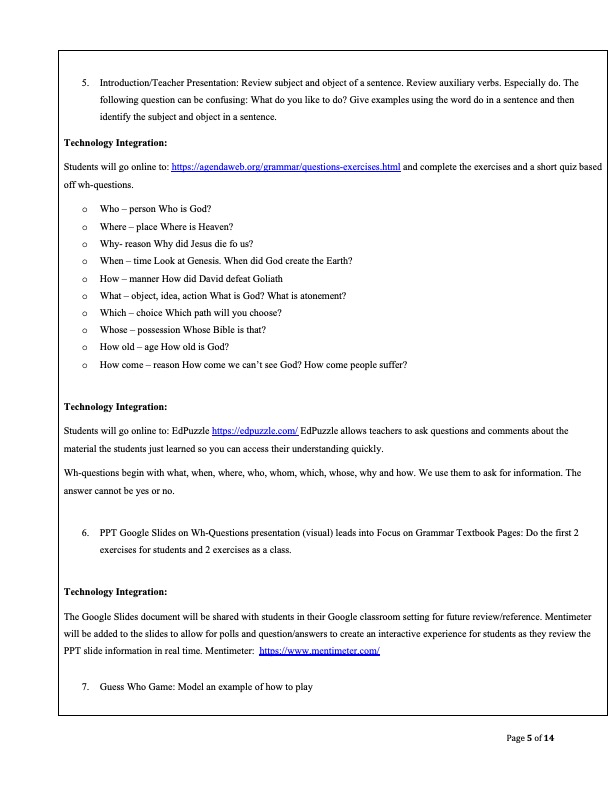
Next, students will use Kahoot as a warm up. This can also be used as an assessment tool that allows for differentiation in vocabulary. Students practice vocabulary daily. This is fun and engages students. Students love to play games and to learn through competition. This was an excellent technology source that allows for a quick assessment. When students are engaged, they can master the content.
After the warm up, we will begin the lesson with the unit lesson. We will use a white board to teach the lesson. Followed by the grammar instruction, students will read in their student textbook. Literably, will be used to hear students read out loud. This is an excellent assessment tool that allows us to hear students read out loud.
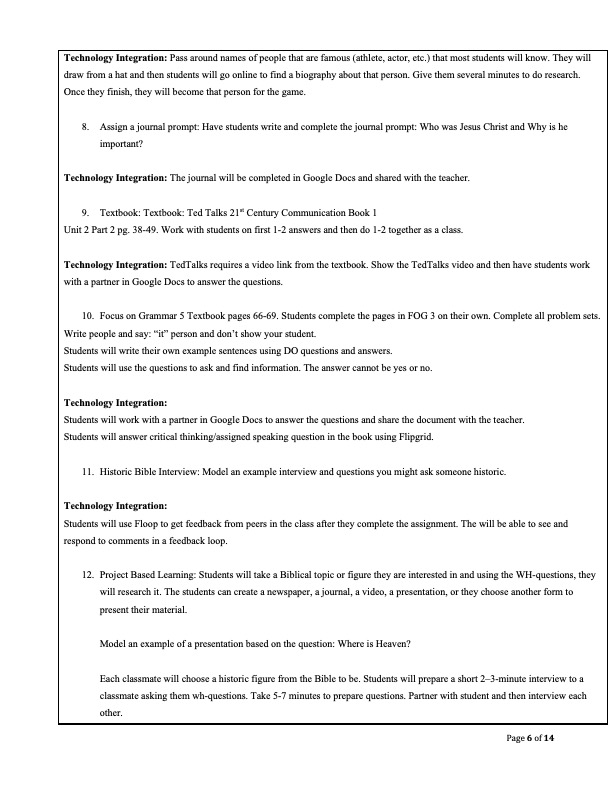
Next, students will use EdPuzzle, which allows teachers to ask questions and comments about the material the students just learned so you can access their understanding quickly. Other technology sources that will be used in this lesson are Floop and Storybird. Floop is used to get feedback from peers in the class after they complete the assignment. Students will be able to see and respond to comments in a feedback loop. Students will use Storybird to answer a prompt about the Bible using various writing tasks, or as a platform for peer workshopping to practice writing using this digital tool.
We will teach using Google Slides to share with students in their Google classroom setting. Students who miss the lesson are able to go back to review the PPT and reference the information they missed. Mentimeter is an excellent tool that enables teachers to put polls and Q&A’s inside the slides. This tool allows for an interactive experience for students as they review the PPT slide information in real time.
Students will complete book work out of TedTalks and Focus on Grammar. Both of these academic sources have digital tools. In the unit we will show the TedTalks video and then have students work with a partner in Google Docs to answer the questions at the end of the textbook chapter.
Flipgrid will be used to answer an exit question. This is an excellent tool for exit questions and to record student responses. Flipgrid allows for differentiation amongst students. Teachers can assign different questions to students. Flipgrid is an excellent digital tool for differentiation. Teachers can assign different questions to students. In addition, students will use Flipgrid to answer critical thinking/assigned speaking question in the book.
At the end of the lesson unit, students will be able to choose a PBL. They will be given several topic choices to choose from. Students will take a Biblical topic or figure they are interested in and using the WH-questions, they will research it. Students will take a Biblical topic or figure they are interested in and using the WH-questions, they will research it. The students can create a newspaper, a journal, a video, a presentation, or they choose another form to present their material. The students can create a newspaper, a journal, a video, a presentation, or they choose another form to present their material.
These technologies provided instruction at the student’s levels. Sources such as Flipgrid allowed for differentiation. We were able to choose the questions students were asked and could scaffold the lessons. This allowed for instruction based on the student’s levels. Students were asked to create eportfolios to demonstrate their work. “Eportfolio allows for students to reflect on and integrate their work to view overall learning progress. The reason that eportfolios have become a successful assessment tool is because they require significant and purposeful work from the student” (Nu-Man & Porter, n.d.). This was an excellent tool that allowed for demonstration of their knowledge.
These are engaging tools and differentiation can occur in a variety of ways based on these tools. These tools can be used to assign different questions and materials based on the levels of students (individually or in the group). Students will work together based on their own levels and then follow instruction.
Technology assessment often allows for quick data. It also provides the opportunity for quick responses and meaningful feedback. Based on the information, the teacher can give immediate feedback and explain missed questions, and meet with the students. Teachers will also know what to re-teach based on the data and information given. Teachers can also be assigned new information and resources to help teach the objective.
Students will gain a global awareness through learning to build strong skills and relationships in the classroom. The students will gain empathy for different cultures and gain an open mind and positive attitude about different cultures. This allows for a deeper understanding of the global community. The literature choices and TedTalks will immerse students in another culture.
Technology in this lesson allows us to teach and engage students. The addition of technology in this unit provides for differentiation. It enables students to master content and to challenge students. Technology can enable teachers to target student’s needs.
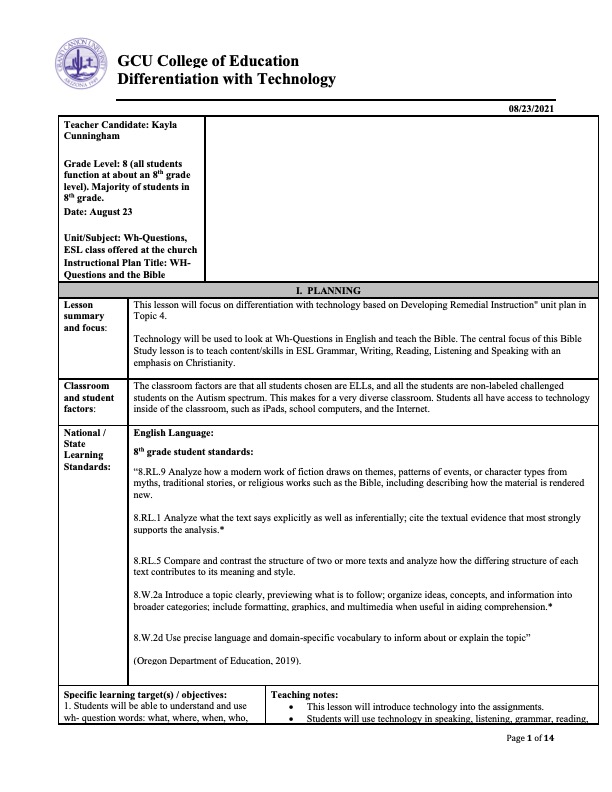
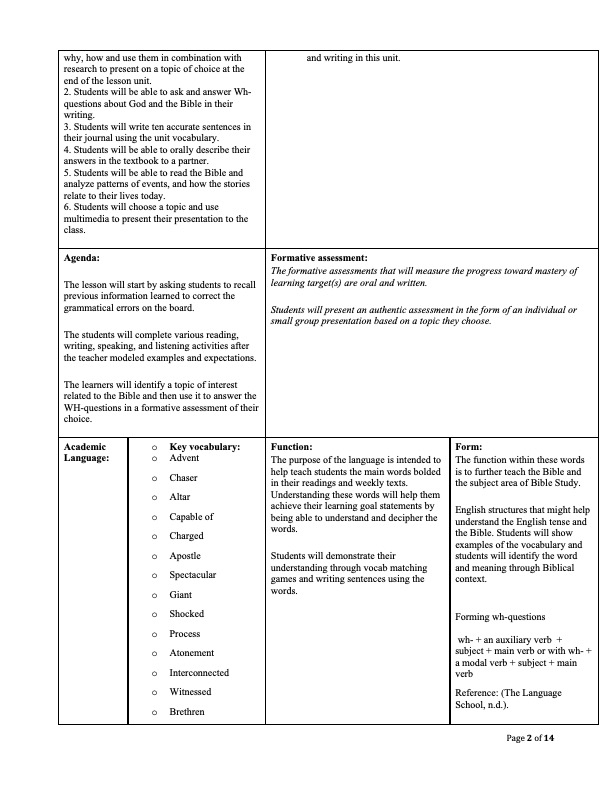
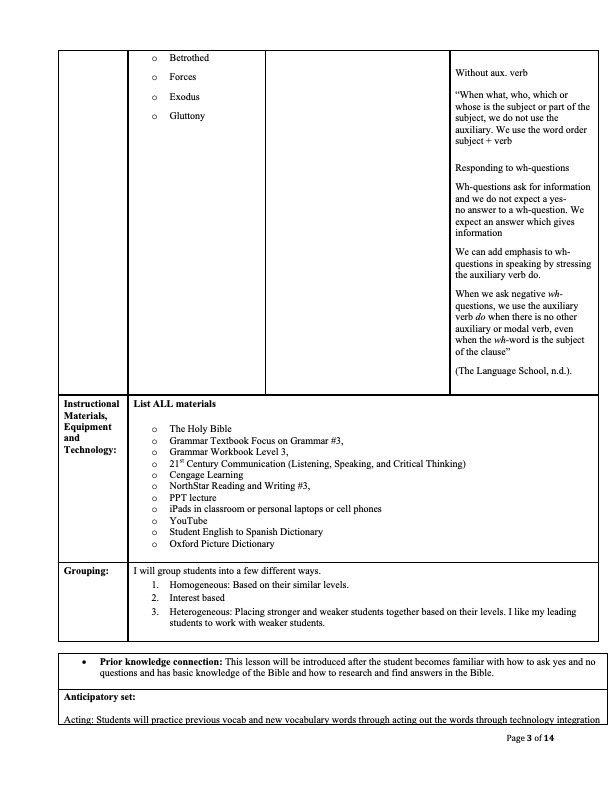
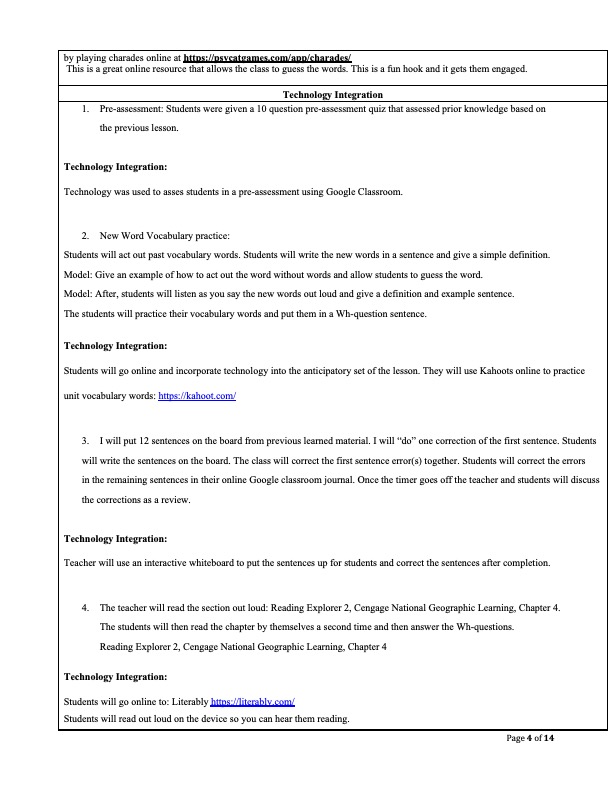
Differentiation with Technology Lesson Example:
Resources
Kurt, S. (2020, November 11). Formative and Summative Assessment. Educational Technology.
Layton, S. (2017, July 20). 9 Tips for Using Technology to Differentiate Instruction. Applied Educational Systems. https://www.aeseducation.com/blog/9-tips-using-technology-differentiate-instruction
Nu-Man, M. R., & Porter, T. M. (n.d.). Chapter 17 Assessing Learning Using Technology. Granite State College. https://granite.pressbooks.pub/teachingdiverselearners/chapter/assessing-learning-using-technology/
Oregon Department of Education. (2019, June). Oregon English Language Arts and Literacy Standards. https://www.oregon.gov/ode/educator-resources/standards/ELA/Documents/Grade%208.pdf
Richards, K. (2019). How to use technology to differentiate instruction in the classroom. Houghton Mifflin Harcourt. https://www.hmhco.com/blog/how-to-use-technology-to-differentiate-instruction-in-the-classroom
The British Language School. (n.d.) Wh-Questions. http://thebritishlanguageschool.com/es/noticias/item/325-whquestions
 Technology-Based Resources